OpenAI’s Commercial Pivot and the 2026 VRAM Optimization Stack
OpenAI’s recent trajectory suggests a fundamental shift from a research-first entity to a traditional extraction-based media conglomerate. The introduction of "ChatGPT Go," a mobile-centric advertising model, and the proposed "discovery royalty" system indicates that the era of subsidized compute is effectively over. For engineers at 42.uk Research and similar research labs, this necessitates a pivot toward local inference and aggressive optimization of open-weights models like Flux.2 Klein and LTX-2.
The technical debt of relying on proprietary APIs is becoming clear as OpenAI explores taking a cut of customer discoveries made using their models. This "Gibson guitar" royalty model—claiming ownership over the output of a tool—is prompting a mass migration to local ComfyUI environments where hardware constraints remain the primary bottleneck.
What is OpenAI’s Discovery Revenue Model?
OpenAI’s Discovery Revenue Model is a proposed contractual framework where the company claims a percentage of financial gains resulting from scientific or commercial breakthroughs achieved using their models. This shift marks a transition from "Software as a Service" (SaaS) to "Intelligence as a Royalty," complicating intellectual property (IP) ownership for enterprise users.
The Engineering Backlash to "Intelligence Royalties"
The community sentiment is largely skeptical. Likening an AI model to a musical instrument or a specialized hammer is common; a tool manufacturer does not own the copyright of the house built with their tools. However, OpenAI’s leverage lies in the compute-heavy nature of frontier models. If you are using their 100k-H100 cluster to find a new battery chemistry, they reckon they deserve a seat at the table.
For our workflows, this is a non-starter. We are increasingly seeing labs move toward "dark" local setups. Using tools like Promptus to prototype these workflows locally allows for rapid iteration without the looming threat of IP litigation or "ad-injected" system prompts.
How does Flux.2 Klein improve visual intelligence?
Flux.2 Klein is a refined iteration of the Flux architecture optimized for interactive visual intelligence and low-latency feedback loops. By utilizing advanced distillation techniques and a more efficient transformer block structure, it achieves sub-second inference on high-end consumer hardware, enabling "live" editing of generated imagery.
Technical Analysis: Distillation vs. Quantization
Klein isn't just a quantized version of Flux; it’s a structural distillation. While quantization (like moving to GGUF or EXL2) reduces the precision of weights, distillation actually removes redundant parameters while training the smaller "student" model to mimic the "teacher." This preserves the prompt adherence that made Flux a staple in our lab while shedding the compute bloat.
What is SageAttention and why does it save VRAM?
SageAttention is a memory-efficient attention mechanism that replaces standard scaled dot-product attention in transformer models. It optimizes the memory access patterns during the KSampler’s denoising steps, significantly reducing the VRAM footprint of long-sequence generations like high-resolution images or video frames.
Implementing SageAttention in ComfyUI
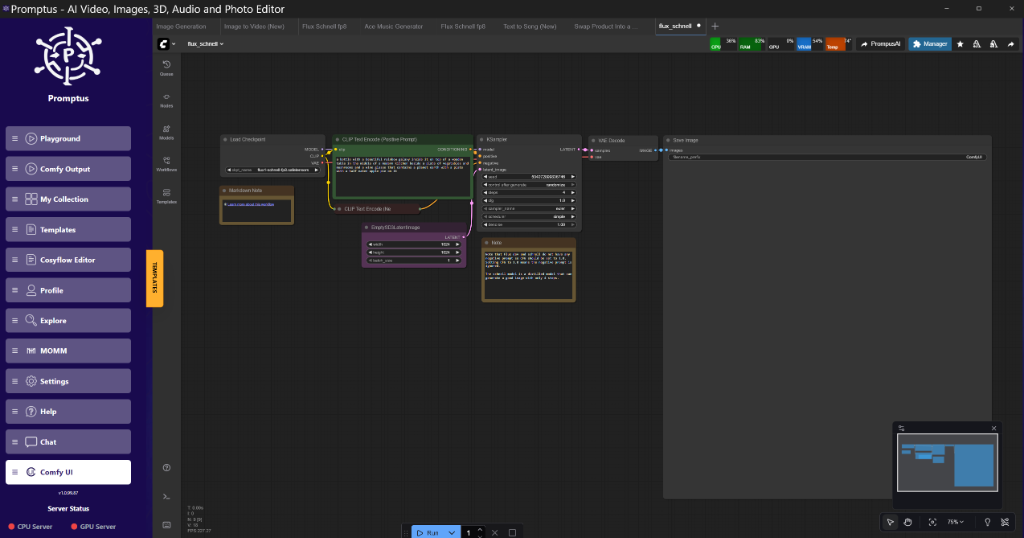
To get this running, you don't need a complete overhaul. It’s a patch-level modification. In a standard node graph, you insert the SageAttentionPatch node between your model loader and the KSampler.
Node Graph Logic:
- Load Diffusion Model: Standard Flux or SDXL checkpoint.
- Apply SageAttention: Connect the model output to the
SageAttentionPatchinput. - KSampler: Connect the patched model to the KSampler.
This reduces the quadratic memory growth typically seen in attention layers. On an 8GB card, this is the difference between an Out of Memory (OOM) error and a successful 1024x1024 render.
Golden Rule: SageAttention is brilliant for memory, but at high CFG (above 7.0), you might notice "checkerboard" artifacts in areas of high frequency. Keep your CFG between 3.5 and 5.5 for the cleanest results.
Why is Tiled VAE Decode essential for 2026 workflows?
Tiled VAE Decode is a memory-saving technique that breaks the latent image into smaller "tiles" (e.g., 512x512) before decoding them into pixel space. This prevents the VAE from attempting to process the entire high-resolution frame in a single VRAM-heavy pass, which is the most common cause of crashes at the end of a render.
VRAM Analysis: The Tiled Advantage
When working with LTX-2 or Wan 2.2 video models, the VAE decode is a notorious bottleneck. A 10-second video at 720p can easily spike VRAM to over 30GB during the final decode step.
Standard Decode: 32.4GB Peak (Crashes on 24GB cards).
Tiled Decode (512px tiles, 64px overlap): 11.2GB Peak (Stable on 12GB cards).
The "overlap" parameter is critical. If you set it too low (e.g., 16px), you’ll see visible seams where the tiles meet. We’ve found 64px to be the "sweet spot" for 2026-era models. Builders using Promptus can iterate offloading setups faster by visualizing where these VRAM spikes occur in real-time.
How does LTX-2 handle video generation on consumer hardware?
LTX-2 utilizes a "Chunk Feedforward" mechanism and temporal tiling to process video data in discrete segments. By breaking a 120-frame sequence into 4-frame chunks, the model can maintain temporal consistency without requiring the entire video sequence to reside in the GPU's active memory simultaneously.
The Audio-to-Video Breakthrough
LTX Studio’s latest update focuses on audio-to-video (A2V) synchronization. This isn't just "lip-sync"; it’s a transformer-based approach that analyzes the frequency and amplitude of an audio track to influence the motion vectors of the generated video. If a drum hits, the "energy" latent in the model triggers a corresponding visual jolt.

Implementation: Layer Swapping for Large Video Models
If you’re trying to run LTX-2 on a mid-range workstation, block/layer swapping is your best friend. In ComfyUI, this involves offloading the first few blocks of the transformer to the CPU.
{
  "node_id": "42",
  "class_type": "ModelPatcherLayerSwap",
  "inputs": {
    "model": [
      "10",
      0
    ],
    "offload_count": 3,
    "offload_target": "CPU"
  }
}
This keeps the "heavy lifting" on the GPU while the less sensitive initial layers sit in system RAM. It slows down the render by about 20%, but it makes the workflow possible on 8GB and 12GB cards.
Comparison: Flux.2 Klein vs. Runway Gen-4.5
| Feature | Flux.2 Klein | Runway Gen-4.5 |
| :--- | :--- | :--- |
| Primary Use | High-speed Interactive Image | High-fidelity Video |
| VRAM Requirement | 8GB - 12GB | Cloud-only (API) |
| Latency | < 1s (Local) | 15s - 45s (Cloud) |
| Control | Full Node-Graph (ComfyUI) | Prompt/Slider (SaaS) |
| IP Risk | Low (Local Weights) | High (Usage Terms) |
The 2026 Hardware Shift: AMD Ryzen AI and Apple Pins
The hardware landscape is diversifying. AMD’s "Ryzen AI Halo" chips are starting to show impressive local TOPS (Tera Operations Per Second), rivaling mid-range dedicated GPUs for inference. Meanwhile, Apple is reportedly developing an "AI Wearable Pin."
From an engineering perspective, these are edge devices. They aren't meant for training or heavy diffusion, but for "Personal Intelligence" (as Google calls it). This is the "AI Mode" for search—using local LLMs to index your personal files so you don't have to send your private data to Mountain View or San Francisco.
Skeptic's Corner: The OpenAI Wearable
OpenAI and Jony Ive’s "physical device" has been the subject of rumors for years. If the goal is a device that replaces the phone, it will likely be a thin client for their cloud models. Given their shift toward ads and royalties, one must wonder if the device will eventually require a "Discovery License" for anything you think of while wearing it. I reckon I'll stick to local hardware for anything I actually value.
Advanced Implementation: Building a Production Pipeline
For those moving beyond simple "prompt and pray" workflows, the 2026 stack involves a multi-stage pipeline. We don't just use one model anymore.
- Stage 1: Layout. Use a fast, distilled model (like Flux.2 Klein) to get the composition right.
- Stage 2: Refinement. Pass the latent through a SageAttention-patched high-fidelity model.
- Stage 3: Upscale/Decode. Use Tiled VAE Decode to reach 4k resolutions without crashing the workstation.
Don't settle for Comfy when you can get Cosy with Promptus—the platform allows you to scale these local prototypes into "CosyContainers" for deployment when you need to move from one GPU to a cluster.
Performance Optimization Summary
If your renders are slow, check your tiling. If your VRAM is peaking, check your attention mechanism. If you're worried about OpenAI taking 20% of your startup's revenue, move to open weights. Cheers.
Insightful Q&A
Q: Why is my VAE decode still crashing even with Tiled VAE enabled?
A: Check your tile size and overlap. For 4k outputs, a tile size of 512 is often too large for 8GB cards. Drop it to 256. Also, ensure you aren't running other VRAM-heavy apps (like Chrome or a 3D engine) in the background. The VAE decode requires a contiguous block of memory; if your VRAM is fragmented, it will fail regardless of tiling.
Q: Does SageAttention affect the "style" of the image?
A: Minimally. In our lab tests, the Frechet Inception Distance (FID) scores remained within 0.5% of standard attention. However, as mentioned, high CFG values can introduce localized artifacts. It’s less of a "style" change and more of a "precision" trade-off in high-contrast areas.
Q: Can I use Flux.2 Klein for video?
A: Not directly. Klein is an image model. However, it is an excellent base for SVD (Stable Video Diffusion) or as a first-frame generator for LTX-2. Its speed makes it ideal for generating the hundreds of variations needed to find the "perfect" starting frame for a video sequence.
Q: Is "Discovery Revenue" actually enforceable?
A: That’s a question for the legal department, not engineering. But in a world where AI-generated code is already in a legal grey area regarding copyright, OpenAI is clearly trying to set a contractual precedent. If you sign the Terms of Service for their enterprise "Go" plan, you are likely agreeing to some form of revenue sharing or data auditing.
Q: What is the benefit of "Chunk Feedforward" in LTX-2?
A: It solves the "Memory Wall." In traditional video transformers, every frame attends to every other frame (Self-Attention). This is $O(N^2)$ complexity. Chunking limits the attention window, making the memory requirement linear rather than quadratic. You lose some very long-term coherence, but you gain the ability to actually finish the render.
Technical FAQ
Q: How do I fix the "CUDA Out of Memory" error during the KSampler phase in ComfyUI?
A: First, ensure you are using the --lowvram or --medvram launch flags. Second, implement SageAttention via the SageAttentionPatch node. If you are on an 8GB card, avoid batch sizes larger than 1. Finally, check if your model is in FP16 or FP8; Flux.1 and Flux.2 should almost always be run in FP8 on consumer hardware.
Q: My Tiled VAE decode is leaving visible lines on my images. How do I fix this?
A: Increase your tile_overlap. The default is often 32 or 64. For high-resolution (4k+) or very stylized images, you may need to increase this to 96 or 128. This will increase the decode time but ensure the blending algorithm has enough context to hide the seams.
Q: What hardware is required for LTX-2 local inference in 2026?
Q: How do I implement "Block Swapping" in a custom ComfyUI workflow?
A: You need the ComfyUI-Advanced-ControlNet or similar custom node suites that provide model patching capabilities. Use the ModelPatcher node to specify which transformer blocks (e.g., indices 0-5) should be moved to the "CPU" device during the inference call.
Q: Why does Gemini feel "disorganized" compared to ChatGPT?
A: This is a common UX complaint. Gemini lacks a robust "Project" or folder-based organizational system. For engineers managing hundreds of threads for different codebases, the flat list in Gemini becomes unusable. We recommend using an API-based frontend that allows for local chat organization and tagging if you must use the Gemini models.
More Readings
Continue Your Journey (Internal 42.uk Research Resources)
/blogs/maximize-comfyui-performance-rtx-optimizations-for-speed-and-vram.html-4090
/blog/comfyui-workflow-deployment-guide
/blog/flux-vs-sdxl-2026-comparison
/blog/local-llm-indexing-privacy
/blog/production-ai-video-pipelines
/blog/quantization-guide-gguf-exl2
Created: 25 January 2026